Video calls with the family — on WhatsApp
Send this before the next family call. It uses WhatsApp on a phone; a guide made from your parent's own screen is even easier to follow.
Step 1
Open the family chat
Open WhatsApp, tap Chats, then open the person or family group you want to see.
Step 2
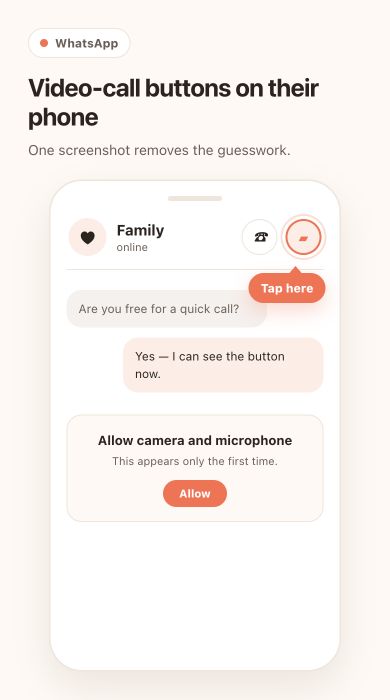 Tap the video camera
It is at the top of the chat. If the phone asks the first time, allow access to the camera and microphone.
Tap the video camera
It is at the top of the chat. If the phone asks the first time, allow access to the camera and microphone.
Tap the video camera
It is at the top of the chat. If the phone asks the first time, allow access to the camera and microphone.
⚠️ WarningUse Wi-Fi for a long callVideo calls use mobile data. At home, connect to Wi-Fi first if the data plan is limited.
Step 3
Tap the screen when the buttons disappear
The microphone, camera and speaker buttons hide during a call. Tap once anywhere on the picture to bring them back.
Step 4
Turn the camera around if needed
Tap the camera-with-arrows button to show the room, the garden or whatever you are looking at.
Step 5
Tap the red button to finish
The call ends straight away. If the buttons are hidden, tap the picture once first.
Put what you know, your stories, or your favorite things into cards. Share them with a link anyone can open, no account needed.
Start on Stepzu