TV says “No signal” — switch the input back
A game console or streaming stick can leave the TV on the wrong input. This is the sort of guide that works best with a photo of the remote you actually use.
1
Turn on the TV and the usual box
If you normally watch through a cable or satellite box, make sure its power light is on too.
2
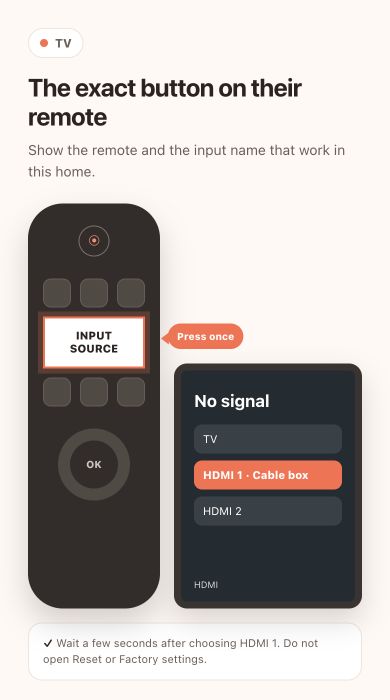
Press Input or Source once
Look for “Input”, “Source”, or a rectangle with an arrow. Press it once and wait for the list to appear.
3
Choose the input you normally use
For a cable box or streaming stick this is often HDMI 1 or HDMI 2. Pause a few seconds on each choice so the picture has time to appear.
⚠️ Do not choose Reset or Factory settings — Those options can erase channels and sign-ins. You only need the short Input or Source list.
4
If it still says “No signal”, check the cable
Make sure the usual box is on and its HDMI cable is firmly connected at both ends. Then choose that HDMI input again.
5
Leave it on the working picture
Once the channel or home screen appears, stop pressing buttons. The TV will usually remember this input next time.